
How to change the display order of categories?
Applicable to : Merlin Backoffice ™ and PrestaCategorie addons (screen shots made with PrestaCategories)
How to change the display order of categories in PrestaCategories or Merlin?
In PrestaShop, the order of display of the categories is always according to their value "position"
In PrestaCategories and in PrestaPricing, you have the choice: positions, id, name, breadcrumb .... This is set in "Display", under "Categories"

But this choice or setting does not change anything in PrestaShop. This is just a display effect in PrestaCategories (or PrestaPricing that has the same setting).
How to change the display order of categories in the shop itself?
To reorder the categories in Prestashop, you must change their "position" value. This can be done from PrestaCategories or Merlin, by clicking on this button:
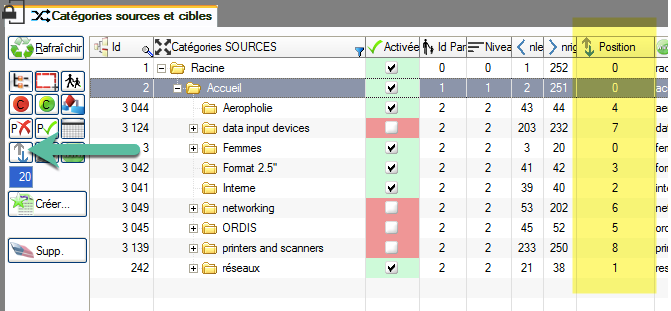
Then dragging and dropping them in the "Position" column. This is of course the case, when the position of a category is modified, it does not change its parent category.
It can not therefore be moved outside its current branch.
Similarly, its sub-categories remain attached, they follow the movement.
The interest of the tool is that it allows to make a multiple selection of categories, to move them all together in a single time.
Next week we will show you how to enable or disable some or all of the category products without having to display them.
Category's other articles Mass management of PrestaShop categories
-
How to duplicate a category with all its products ?
How to
This very simple trick, using PrestaCategories or Merlin PrestaShop add-ons, will allow you to mass duplicate categories and copy also their associated products, without creating duplicates
-
Change the display order of PrestaShop products
How to
Learn how you to change the position of products in each of their associated categories using Prestashop admin and how to bulk do it quickly using the Merlin Backoffice or PrestaCategories addons
-
How to associate products to PrestaShop (secondary) categories in bulk
Tuto
Video
Learn two methods, explained with images and video, how to link products and categories, one by one using PrestaShop, or massively using Merlin Backoffice addon from Sitolog
-
Put discounted products in a category
Trick
Move or combine sale products in a discounted product category