
Automatically run MagicFormula and MagicEdit every time the file is re-read
I use the same mapping for every import, so I'd like to apply the same processing to my columns across multiple different files.
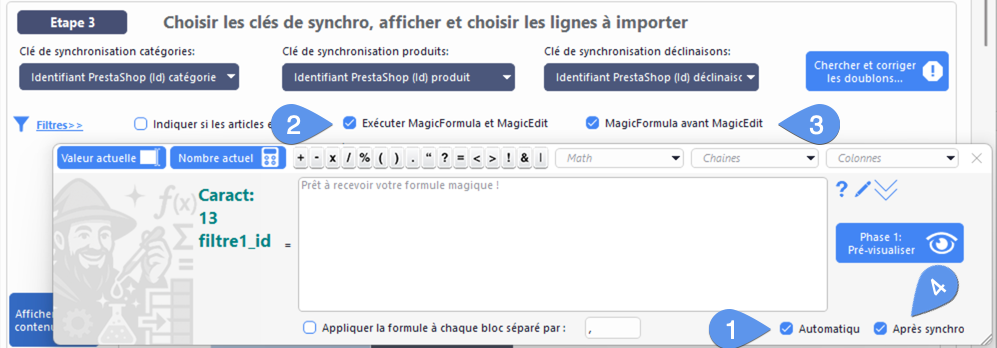
Since version 2.0.1 of Merlin BackOffice ® Flex, both tools can indeed be run (independently for each column) automatically every time the file is re-read. To do this, you must check the “Automatic” box (1) when you validate the MagicFormula formula or the MagicEdit settings.
These settings are linked to the column AND the mapping template, and are automatically saved with them.
So if you reuse the same template in different tasks, you can retrieve the formulas and settings.
Note also that you can choose to disable these tools (2) globally (without deleting them from the columns), or change the execution order (3)—MagicEdit followed by MagicFormula, or vice versa.
To do this, you need to expand the hidden “Filters” section in step 3 to access these two settings.
As a bonus, you can also specify whether these automated scripts should run before (4) or after synchronization. That is, before or after the system checks for the existence of items based on their synchronization key.
Example: Your file contains a column with only some of the item IDs (123, 456, 333, ...), with the actual SKUs in the format ref123, ref456, ref333. In this case, you can, with a wave of a magic wand, have “ref” added to the beginning of all values in the column BEFORE synchronization, so that the products are correctly searched for and found using their full SKU values.
Category's other articles Import into PrestaShop database
-
Importing attribute declinations into PrestaShop
Video
How to
Importing attributes and declinations into PrestaShop explained in images and video. Two methods, including the Merlin method, are presented and compared to ensure a successful import
-
Categories synchronisation key
Guide
How to configure the categories synchronisation key to successfuly import with Merlin Backoffice
-
How to import new attributes, suppliers, features
How to
Tutorial showing how to easily and rapidly import new attributes, suppliers, manufacturers and features into PrestaShop without creating new products or new variants, using PrestaPricing
-
Importing PrestaShop custom fields
Guide
How to
Introducing the most efficient way to quickly enter data into PrestaShop's custom, free, non-standard fields, which have been added to a table
-
Importing product packs into PrestaShop
How to
Step-by-step illustrated tutorial showing how to import multi-product packs into PrestaShop, using the Merlin Backoffice module
-
Automated obsolescence
Tuto
Our method for automating the obsolescence of products and variations that your suppliers no longer sell or are out of stock