
Forum sur l'installation du module PrestaShop PrestaPricing » 

[FAQ] Problème de connexion à mon site Prestashop

Auteur Message

Sitolog

Inscrit le : 04/12/2011

Messages : 524

Publié : 07/03/2015 18:55:11 "Citer"

Bonjour Fabrice,

Votre serveur ne supporte pas le mode "crypté". Dans ce cas de figure, passez le niveau d'interface en "complète" et choisir l'option "Compressées mais non cryptées" ou encore "Ni encryptées ni compressées".

Si cela ne fonctionne toujours pas, m'appeler.

Crdl
Franck

Fabrice B.

Inscrit le : 13/07/2014

Messages : 4

Publié : 07/03/2015 23:00:57 "Citer"

Merci bcp tous fonctionne bien et bravo pour vos logiciel

Sitolog

Inscrit le : 04/12/2011

Messages : 524

Publié : 17/03/2015 15:53:29 "Citer"

Bonjour Fabrice,

Désolé pour cette réponse tardive (pour un support instantané je recommande encore une fois de mon contacter par tchat, mail ou tel, le forum est plus adapté aux questions génériques qu'aux cas particuliers).

Ce message indique que la fonction de cryptage des données ne fonctionne pas avec votre serveur. Essayez dans un premier temps avec une autre valeur pour la clé de cryptage et si cela ne change rien, choisir un des deux autres modes proposés, comme "Compressées mais non cryptées".

Crdlt
Franck

Sitolog

Inscrit le : 04/12/2011

Messages : 524

Publié : 25/05/2015 11:56:47 "Citer"

Pour info, la dernière version de PP (6.6.1) et de PC (4.1.1), avec leur module sitologapplicationconnect en version 4.5.e sont compatibles avec les dernières versions de PHP (utilisent l'API MySQLi_).

Si vous avez un soucis de connexion malgré cela, merci de me contacter en privé pour une séance de support avec partage d'écran.

Crdlt
Franck

Navid A.

Inscrit le : 07/05/2015

Messages : 3

Publié : 17/03/2016 19:52:38 "Citer"

How to connect PrestaPricing/PrestaCategories to IP address?

In a temporary e-commerce, without the domain, I needed to use the IP address to connect PrestaPricing.
In the URL box, I typed 212.239.234.142 but it did not work... PrestaPricing didn't like it!!
My temporary shop doesn't have a URL htttp:www.myshop.com but just an IP address, but PrestaShop can not connect to the PrestaShop e-commerce with the IP address only.

The solution is to cheat PrestaPricing by changing your hosts file, here is a explanation how to modify your hosts filehttps://support.rackspace.com/how-to/modify-your-hosts-file/ (remember to open the editor as administrator).

Now back to PrestaPricing, add normally the domain name in the URL box .... et voilà...you are connected!!

good luck
Navid

Sitolog

Inscrit le : 04/12/2011

Messages : 524

Publié : 17/03/2016 20:43:49 "Citer"

Thank you Navid for sharing this alternative solution.

As mentionned to you, on my side it did not need to edit the host, it did work with IP addresses exactly like with an url.

It even works from a Windows session using Parallels Desktop on a MAC, to connect to a site installed in the virtual Apache server of the same MAC. In such case I use the IP address of the MAC itself.

But your solution is worth trying for all others having difficulties to make it works natively.

Rgds
Franck

Sitolog

Inscrit le : 04/12/2011

Messages : 524

Publié : 28/06/2019 09:15:54 "Citer"

Quote HUGZZZ :
Bonjour,
ça coince sur "ouverture fenetre principale"

juste avant j'ai ce message :
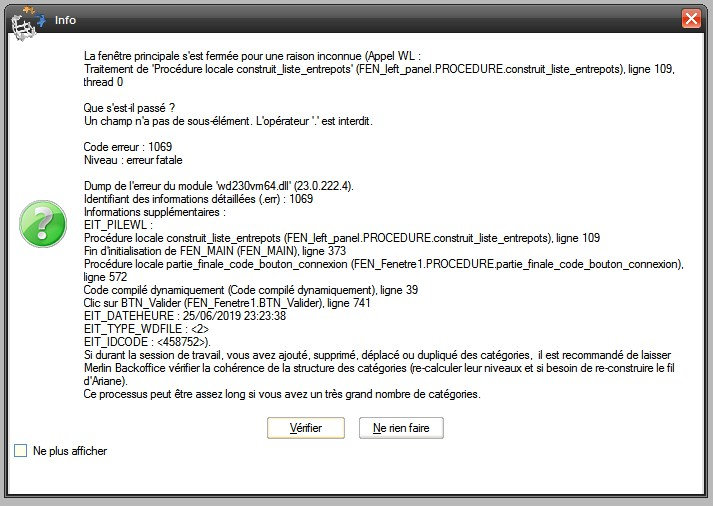
https://zupimages.net/up/19/26/xheo.jpg


Cette erreur est due au nom donné à l'un des entrepôts, qui contient un espace. Le retirer (le remplacer par un tiret) résout le problème.

Ce bug à fait l'objet d'un correctif à partir de la version 1.4 de Merlin Backoffice.

Crdlt
Franck

Navid A.

Inscrit le : 07/05/2015

Messages : 3

Publié : 28/06/2019 09:45:13 "Citer"

There are many reasons that IP address can't work into the Merlin configuration. There is no bug in Merlin, it's the way hosting companies work, to see is a list of reasons see https://www.inmotionhosting.com/support/website/website-troubleshooting/cannot-access-using-ip-address.

The developer can change the hosts file in his/her own computer, but how to show it to a client?
Many times you can't expect your client to edit the hosts file... too complicated.

Then how can you test your new site before it goes live?
Just use the free service at https://hosts.cx/:
1) insert IP address
2) insert website name
3) click button "GET MY TESTING URL"
Now you can use any browser to test a site or keep the real address hidden.

You can use the site created by https://hosts.cx/ into Merlin to import/edit your site.
I tested this personally and it works.

I hope it helps you all.
Navid

Franck B.

Inscrit le : 21/06/2019

Messages : 1

Publié : 28/06/2019 09:47:27 "Citer"

Thanks Navid for sharing this tip

athlerunning

Inscrit le : 03/12/2020

Messages : 1

Publié : 21/11/2022 22:37:32 "Citer"

Bonjour,
Suite a notre mise a jour de la version 1.6 a 1.7 sur prestashop, j'ai un message d'erreur qui apparait et je ne peux donc plus me connecter sur merlin.
Toutes les infos de connexion sont pourtant juste.
Avez vous une solution?
Merci,
Michael GUILLAUME

Réglages
  • Identification
Menu